
Premium Ticketing Features To Create Events In The COVID Era
As we enter the second half of 2020, event regulations and gatherings seem to have caught on along with the phase-wise re-opening. Needless to say, many event organizers and venue…

If you’re a non-profit entity, you’re eligible to receive our flat 50% rebate on your monthly invoice for any fundraising or charitable event you sell tickets for. We also have a feature called “Accept Donations” which is specially designed for non-profit entities to be able to collect donations from their Online Ticket Store and Virtual Box Office.
It is applicable for presenters across all our pricing tiers, irrespective of whether it is a general admission or reserved seating event.
Click on your account name on the top left corner, and go to “Settings”.
Select the ‘Accept Donations’ tab to fill in your merchant details. 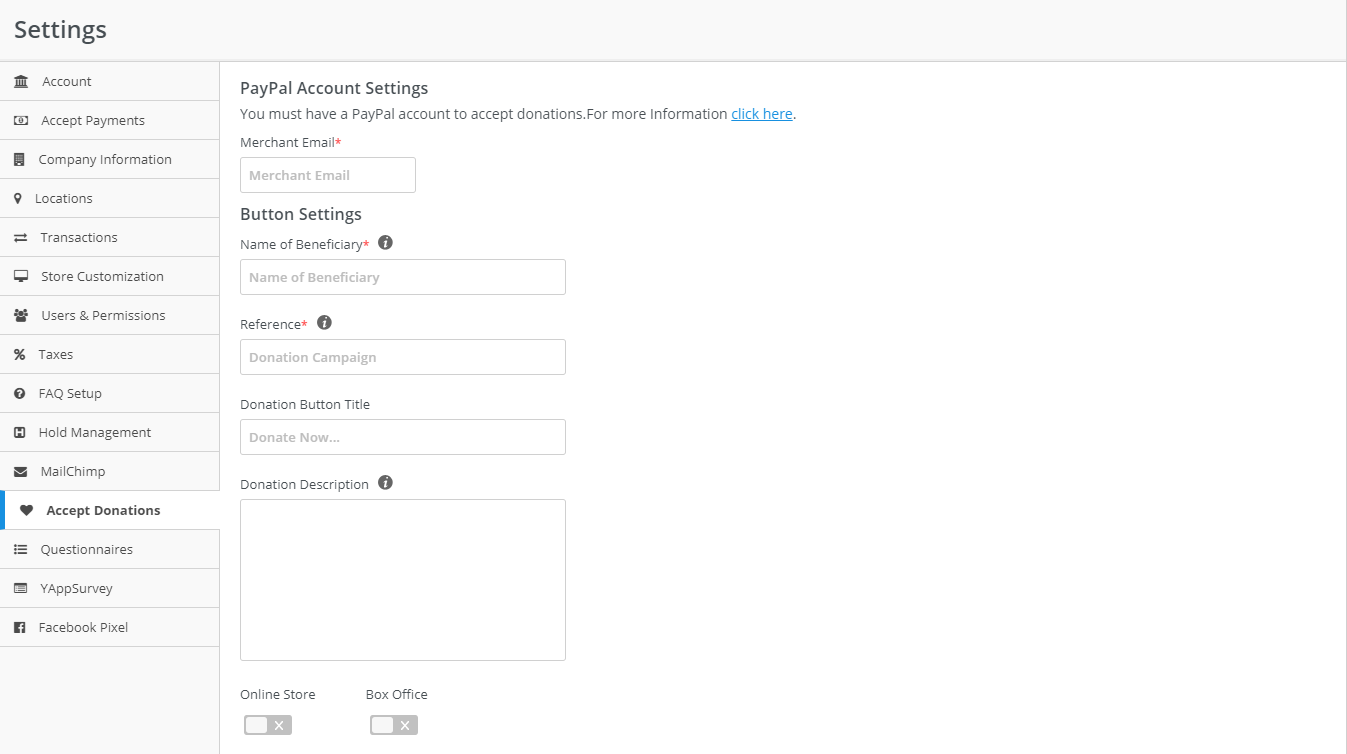
Enter all your relevant details. For accepting donations at both the ‘ Online Ticket Store ‘ and the ‘Box Office’ enable both the options. You can also enable just a single option based on your chosen method of ticket selling.

Check your ‘Accept Donations’ button which will be now displayed at the top center of your Online Ticket Store

and at the bottom of your Box Office page depending on the options you’ve enabled.






